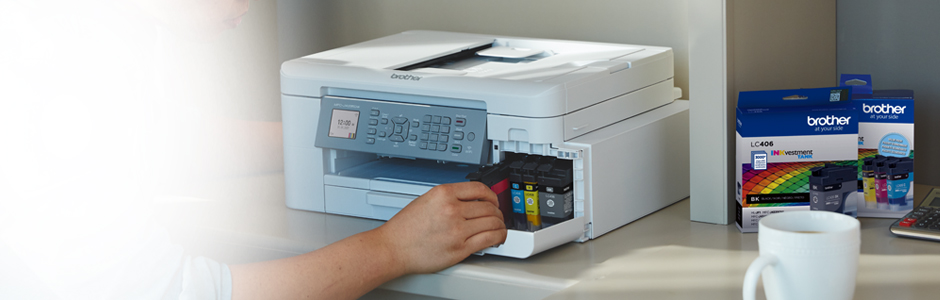

Brother MFC-J4335DW INKvestment Tank All-in-One Colour Inkjet Printer
Brother MFC-J4335DW INKvestment Tank All-in-One Colour Inkjet Printer
- Model #:
- MFCJ4335DW MFCJ4335DWBrother
The MFC-J4335DW INKvestment Tank all-in-one colour inkjet printer is ideal for home and home office use. Its reengineered high-capacity in-box ink cartridges provide up to 1 year of uninterrupted printing. Print and copy from your mobile device plus scan and fax. See full product description
 In Stock and Ready to Ship

Colour
Print/Copy/Scan/Fax

Speed
22 ppm BK/20 ppm Colour

Print subscription 1
Sign up now to print FREE for 4 months

Print subscription 2
Sign up now to print FREE for 4 months

Print subscription 3
Sign up now to print FREE for 4 months
Product Description
The Brother MFC-J4335DW INKvestment Tank all-in-one colour inkjet printer is an ideal choice for home and home office use. It features reengineered high-capacity ink cartridges that provide up to 1 year of uninterrupted printing of approximately 150 pages per month, using only the cartridges provided in-box. Its intuitive 1.8 colour display lets you navigate to powerful features plus print-from and scan-to popular cloud services including Google Drive , Dropbox Box, OneDrive, and more directly from the printer. It offers two-sided printing, wireless, wireless direct and USB connectivity and Page Gauge technology that monitors your ink, so you never run out of ink in the middle of a print job. Add to all that a 2-year warranty, and you've got a printer that's a smart pick for all your printing, copying, scanning, and faxing needs.
To learn more about the 'Brother MFC-J4335DW INKvestment Tank All-in-One Colour Inkjet Printer', download the brochure here.
Main Features
- Uninterrupted printing for up to 1 year with in-box ink (approximately 150 pages per month)
- Reengineered Brother INKvestment Tank technology
- Flexible connectivity including Wireless, Wireless Direct, and USB
- Ideal for home and home office use
- Print speeds up to 20 ppm black/19 ppm colour
- Mobile device compatibility for convenient printing and copying from your phone or tablet plus scanning and faxing
- Page Gauge technology monitors ink use so you never run out of ink in the middle of a print job
- Colour flatbed scanner lets you scan documents up to 8.5" x 11"
- 1.8" colour display for easy onscreen menu navigation
- 2-year limited warranty for peace of mind
INKvestment Tank All-in-One Colour Inkjet Printer
Exceptional print quality and uninterrupted printing
The Brother MFC-J4335DW provides users with amazing convenience, uninterrupted printing, and sensational savings! Get up to 1 year of ink with just the 4 cartridges provided in-box*.
*Based on average monthly print volumes of approximately 150 pages at 60% black pages/40% colour pages in accordance with ISO/IEC 24711 using 4 cartridges provided in-box.
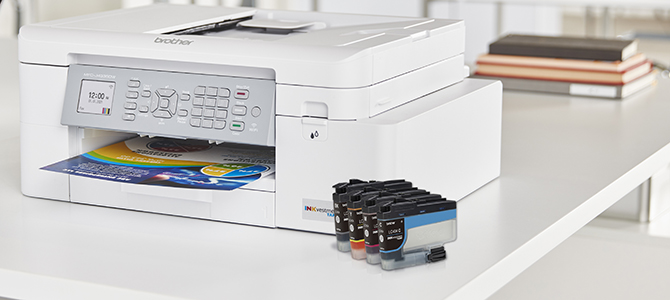
Cutting-edge INKvestment Tank technology simplifies printing
With Brother INKvestment Tank technology, spend less time replacing cartridges and more time printing! These reengineered high capacity ink cartridges hold more ink than traditional cartridges, providing you with superior savings.
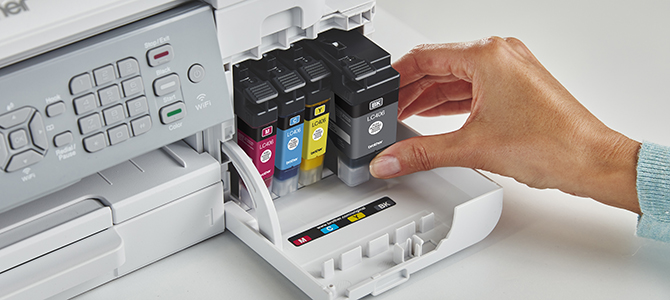
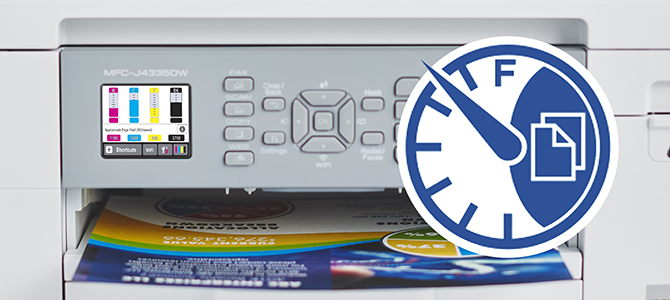
Print with confidence using Page Gauge
Help take the guesswork out of ink replacement with Brother Page Gauge, a visual, numerical way to know the amount of ink you've used and how much is left. Check ink levels directly from the printer's LCD display or use the free Brother Mobile Connect app to check from virtually anywhere using your mobile device.
Advanced connectivity options for all your printing needs
Customize your printing experience with an array of connection options including built-in wireless*, Wi-Fi Direct®, local connection to a single computer via USB interface. It also works with Alexa.
*Requires connection to a wireless network. Brother Mobile Connect and Brother iPrint&Scan free app download are not available in all countries.

| Paper Handling Size - Paper Tray | Letter |
| Print Paper Size | Letter |
| ISO-based Print Speed (Black) | 20ppm (ISO/IEC 24734) |
| Duplex Printing | Yes |
| Functions | Print,Copy,Scan,Fax |
| Print Technology | InkJet |
| Print Colour | Colour |
| Print Media Type | Photos,Documents,Presentations,Business Cards |
| Duplex Printing Capability | Yes |
| Print Resolution (max. dpi) | Up to 4800 x 1200 dpi |
| Additional Printing Features | Mobile printing,Enhanced paper handling |
| Max. B&W Print Speed | 20 ppm |
| Max. Colour Print Speed | 19 ppm |
| Barcode Printing | No |
| Max. Printing Size | Letter |
| Monthly Print Volume | 250 - 2,000 pages |
| Recommended Monthly Print Volume (Up to) | 2000 pages |
| Borderless Printing | Yes |
Copy
| Copy Resolution (Up to) | 1200 x 1200 dpi |
| Copy Reduction/Enlargement | 25%-400% |
Scan
| Scanning Method | CIS |
| Interpolated Scan Resolution (dpi) | Up to 19200 x 19200 dpi |
| Colour/B&W Copying | B&W & Color |
| Duplex Scanning | No |
| Scan Media Type | Photos,Documents,Presentations,Business Cards |
| Scan To Feature | Cloud (Web Connect),Easy Scan to Email |
| Scan Paper Size | Letter |
| Additional Scanning Features | Scan to Email |
| Document Glass Size | Letter |
| Scanning Capability | B&W & Colour Scanning |
Fax
| Speed Dial (# of Locations) | 40 |
| PC Fax Capability (send/receive) | Yes |
| Fax Modem Speed | 14.4kbps |
Other
| High-Yield Replacement Supply Available | Yes |
| Standard Interface(s) | Hi-Speed USB 2.0,Wireless 802.11b/g/n,Wireless 802.11b/g/n (with Wi-Fi Direct® protocol) |
| Warranty | 2-Year Limited Warranty |
Hardware Features
| Standard Paper Capacity | 150-Sheet Input Capacity |
| ENERGY STAR® Qualified | Yes |
| Connectivity | Wi-Fi,USB |
| Max. Monthly Duty Cycle | 30,000 pages |
| LCD Display | 1.8" Color Display |
| Legal-sized (8.5" x 14") Document Glass | No |
Software Features
| Windows®/Mac OS® | Yes |
| Network Features | Wireless |
| Brother Cloud Apps | Brother CreativeCenter,Scan To Office,Easy Scan To Email,Fax Forward to Cloud / Email,Scan to Mobile |
| Wi-Fi Direct | Yes |
| Reduction/Enlargement | 25%-400% |
Ink
Brother Genuine LC406XLCS High-Yield Cyan Ink Cartridge
- Item #:
- LC406XLCS
Brother Genuine LC406XLCS High-Yield Cyan Ink Cartridge
- Item #:
- LC406XLCS
Brother Genuine LC406XLMS High-Yield Magenta Ink Cartridge
- Item #:
- LC406XLMS
Brother Genuine LC406XLMS High-Yield Magenta Ink Cartridge
- Item #:
- LC406XLMS
Brother Genuine LC406XLYS High-Yield Yellow Ink Cartridge
- Item #:
- LC406XLYS
Brother Genuine LC406XLYS High-Yield Yellow Ink Cartridge
- Item #:
- LC406XLYS

Brother MFC-J4335DW INKvestment Tank All-in-One Colour Inkjet Printer
Model #: MFCJ4335DW
Not Your Product ?Downloads & Documents
Downloads & Drivers
Get Downloads & Drivers for this Product from the Brother Solutions Centre
Find Downloads & Drivers Download iPrint&Scan App
Manuals & Documents
Get Downloads & Drivers for this Product from the Brother Solutions Centre
Download Manuals & DocumentsProduct Brochure
Everything you want to know about your product is available in PDF.
Download Product Brochure


Brother MFC-J4335DW INKvestment Tank All-in-One Colour Inkjet Printer
Model #: MFCJ4335DW
Not Your Product ?
Downloads & Documents
Downloads & Drivers
Get Downloads & Drivers for this Product from the Brother Solutions Centre
Find Downloads & DriversDownload iPrint&Scan AppManuals & Documents
Get Downloads & Drivers for this Product from the Brother Solutions Centre
Download Manuals & DocumentsProduct Brochure
Everything you want to know about your product is available in PDF.
Download Product BrochureWarranty
2-Year Limited Warranty
Return Policy
You can return any Brother machine purchased on brother.ca within 30 days of purchase as long as it’s unopened, intact and has a valid Return Material Authorization (RMA) number.* Contact us so that we can assess the best solution for you, either by providing you with a different machine, helping with the setup or issuing an RMA. Any shipping costs are at your expense. However, if we determine that the machine is defective—or if we’re otherwise responsible—we’ll be happy to arrange a pickup at our expense. Once we’ve inspected the return, we’ll refund your credit card.
If your machine was not purchased from brother.ca, simply let us know and we’ll do our best to find a solution.
To contact us through Ask a Question click here: https://support.brother.ca/app/ask









 Your product has been added to your cart