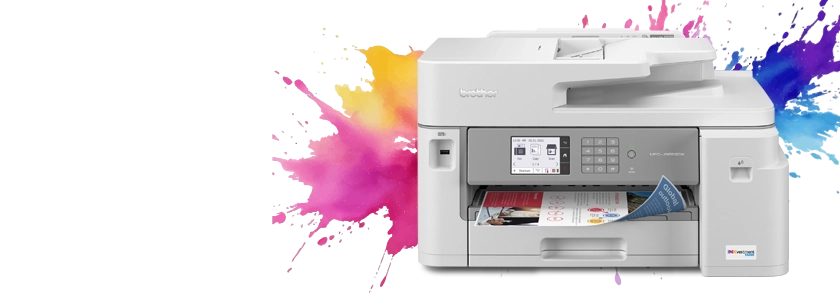
Brother MFC-J5855DW INKvestment Tank All-in-One Colour Inkjet Printer
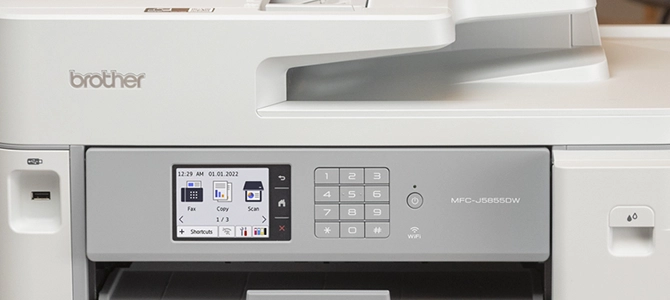
Brother MFC-J5855DW INKvestment Tank Colour Inkjet All-In-One Printer with printing capabilities up to 11 x 17
- Model #:
- MFCJ5855DW MFCJ5855DWBrother
The eco-friendly Brother MFC-J5855DW INKvestment Tank colour inkjet all-in-one with advanced triple layer security is perfect for home office or small business use. Print, copy, scan, and fax from a computer, mobile device, or from its 3.5 LCD colour touchscreen. See full product description
 In Stock and Ready to Ship

Colour
Print/Copy/Scan/Fax

Speed
30 ppm Black/30 ppm Colour

Connectivity
Wi-Fi, Ethernet, USB

Paper Capacity
250-pg input, 100-pg ADF

Economical
6,000-pg BK/ 5,000-pg Colour replacement cartridges

2-sided
Duplex printing
Product Description
The Brother MFC-J5855DW INKvestment Tank colour inkjet all-in-one printer delivers economical, reliable, professional-quality printing for home or work with up to 1 year of ink in-box. Whether you re printing personal documents, school reports or large presentations, you can count on quick printing with vibrant colours and sharp text. Flexible connectivity includes built-in dual band wireless (2.4GHz/5GHz), Wi-Fi Direct®, Ethernet, local USB connection, and print & scan on the go with the Brother Mobile Connect App so you can work where and when you want. Print, copy, scan, and fax functions are easy to manage from a computer, mobile device, or using the intuitive 3.5 LCD colour touchscreen. Eco-friendly features like EPEAT® and ENERGY STAR® certification, Eco Mode and Ink Save Mode that help reduce power and ink use, and default duplex printing that saves paper and money help you do your part for the planet. Rest easy knowing that advanced triple layer security helps safeguard sensitive documents while printing. Built to last and designed for exceptional ease of use right out of the box, this Brother INKvestment Tank printer is a smart choice for your home office or small business.
To learn more about the 'Brother MFC-J5855DW INKvestment Tank Colour Inkjet All-In-One Printer with printing capabilities up to 11 x 17', download the brochure here.
Main Features
- Reliable printing that lasts. Start printing and keep printing for a long, long time with up to 1 year of ink in-box. Brother INKvestment tanks are bottle-free no fuss, no mess!
- Features MAXIDRIVE Inkjet Technology. Brother s next generation of inkjet printing technology, the MFC-J5855DW features our fastest INKvestment tank print speeds ever up to 30 ppm.
- Keep your business documents secure. Triple Layer Security features help safeguard sensitive documents and securely connect to the device and network while printing.
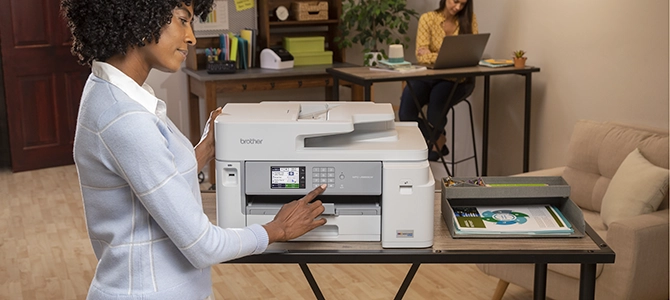
- Versatile paper handing. Print up to 11 x 17" (ledger) size from the 250-sheet tray or use the 100-sheet multipurpose tray to print on envelopes, cardstock and more. Copy, scan, or fax up to 8.5 x 11" (letter) size with the 50-page auto document feeder.
- Flexible connectivity. Use built-in dual band wireless (2.4GHz / 5GHz)3, Wi-Fi Direct, connect via Ethernet, or even connect to a single computer through a USB cable. Even works with Amazon Alexa!
- Print on the go. Print, scan, and manage your printer from almost anywhere when connected through a wireless network using the Brother Mobile Connect App.
- Intuitive Cloud connection. Print-from and scan-to popular cloud apps like Dropbox, Google Drive , Evernote, OneNote and more directly from the 3.5" colour touchscreen. Create time-saving custom shortcuts right on the screen for frequently used features.
- Eco-friendly features. EPEAT® and ENERGY STAR® certified with eco-friendly options like Eco Mode and Ink Save Mode. Plus, default duplex printing helps reduce paper use.
- Print confidently with Brother Genuine Ink. Brother Genuine Ink is engineered to perform optimally with your Brother Colour INKvestment printer, to ensure smooth and reliable printing with vivid colours and sharp images.
- Brother At your side support. Two year limited warranty with free online or live chat support for the life of your product.
Features MAXIDRIVE Inkjet Technology
Leveraging Brother’s next generation of inkjet printing technology, the MFC-J5855DW features our fastest INKvestment tank print speeds ever, up to 30 ppm, and a 40,000-page maximum monthly duty cycle that can keep up with the fast pace of your small business.
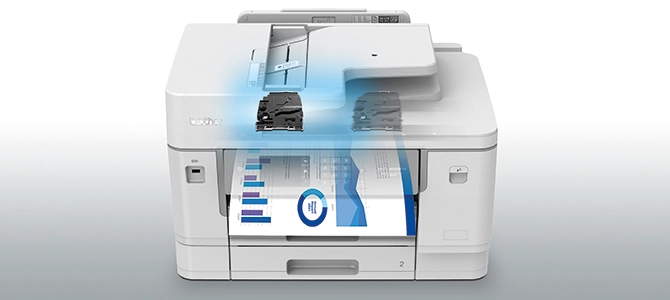
More security
Print your documents with peace of mind. With security features available like triple-layer security on standard-level printers keep your network protected with encrypted data and prevent hacking, even wirelessly.
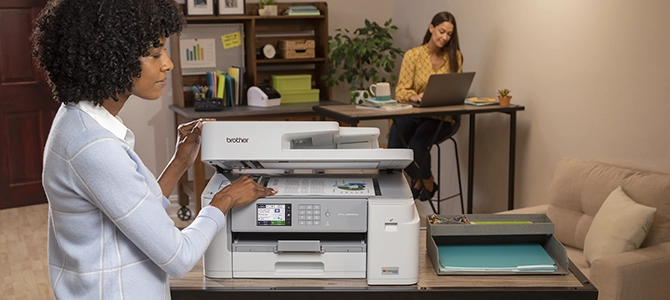
More features
Loaded with convenient business features like an intuitive 3.5” LCD colour touchscreen display, functions that let you print, copy, scan, and fax, plus mobile device printing and scanning. Moreover, advanced triple-layer security helps safeguard sensitive documents and restrict use by unauthorized users.
Versatile paper handing
Print up to 11” x 17" (A3, ledger) paper from the 250-sheet tray or use the 100-sheet multipurpose tray to print on envelopes, cardstock and more. Copy, scan, or fax up to 8.5” x 11" (letter) size with the 50-page auto document feeder.
| Paper Handling Size - Paper Tray | Letter,Legal,Ledger,Executive,C5 Envelope,Com-10,DL Envelope,Monarch,A3,A4,Index Card 5 x 8,A5,A6,Photo 3.5"x5",Photo 4"x6",Photo 5"x7" |
| ISO-based Print Speed (Black) | 30ppm (ISO/IEC 24734) |
| Duplex Printing | Yes |
| Print Technology | InkJet |
| ISO-based Print Speed (Colour) | 30ppm (ISO/IEC 24734) |
| Duplex Printing Capability | Yes |
| Print Resolution (max. dpi) | Up to 4800 x 1200 dpi |
| Barcode Printing | No |
| Max. Printing Size | Ledger |
| Recommended Monthly Print Volume (Up to) | 3500 pages |
| Borderless Printing | Yes |
Carton Contents
| Carton Dimensions (W" x D" x H") | 25.6" (W) x 20.4" (D) x 16.5" (H) |
| Carton Weight | 43.6 lbs. |
| Carton Contents | Brother MFC-J5855DW, Black, Cyan, Magenta, Yellow Starter Ink Cartridges, Quick Setup Guide, Product Safety Guide, Reference Guide, Telephone Line Cord, Warranty Card |
Copy
| Copy Resolution (Up to) | 4800 x 1200 dpi |
| Stand-alone Copying | Yes |
| Duplex Copying | No |
| Sorting Function | Yes |
| Copying Capability | B&W and Color Copying |
Scan
| Optical Scan Resolution (dpi) | 600 x 600 dpi (ADF),1200 x 1200 dpi (color) (Flatbed) |
| Duplex Scanning | No |
| Scanner Driver Compatibility | Windows®,Mac OS® |
| Scan To Feature | Email,Email Server (download),File,FTP,Image,Media Cards,Network,OCR,USB Memory |
| Document Glass Size | Letter |
| Scanning Capability | B&W & Colour Scanning |
Fax
| PC Fax Capability (send/receive) | Yes |
| Best Transmission Speed | 3 seconds |
| Out-of-Paper Reception | Yes |
| Broadcasting (# of Locations) | 250 Locations |
| Fax Modem Speed | 33.6kbps |
| Document Memory Backup | No |
| Fax Page Memory | Up to 150 Page Fax Memory |
Other
| Security Functions | Secure function lock |
| Sheet Weight - Paper Tray | 17-58 lb (Bond) |
| Sheet Weight - ADF | 17-24 lb |
| Standard Interface(s) | Ethernet 10/100,Hi-Speed USB 2.0,Wireless 802.11b/g/n(2.4GHz),Wireless 802.11a/n (5GHz) |
| Min. Input for ADF (Width/Height) | 4.1" W/5.8" H |
| Warranty | 2-Year Limited Warranty |
| Paper Handling Size - Multipurpose Tray | Letter,A3,Legal,Executive,A4,A5,A6,C5 Envelope,Com-10,DL Envelope,Indexcard 5" X 8",Ledger,Monarch,Photo 5" X 7",Photo 4" x 6",Photo 3.5" x 5" |
| Min. Paper Width/Length (Paper Tray) | 3.5" W/5" L |
| Unit Weight | 39 lbs. |
| Sheet Weight - Multipurpose Tray | 17-58 lb (Bond) |
| Unit Dimensions (W" x D" x H") | 21.5" (W) x 17.2" (D) x 12" (H) |
Hardware Features
| Output Paper Capacity (Sheets) | 100 sheets |
| Standard Paper Capacity | 250 Sheet Paper Capacity |
| Multipurpose Tray Capacity | 100-sheet multi-purpose tray |
| Max. Paper Capacity (ADF up to; sheets) | 50 sheets |
| Max. Monthly Duty Cycle | 40,000 pages |
| LCD Display | 3.5" Touchscreen |
| Standard Memory | 256Mb |
| USB Direct Interface/PictBridge | No/Yes |
| Max. Input of ADF (Width/Height) | 8.5"/14" |
Software Features
| Supported Network Protocols (IPv6) | Custom Raw Port/Port9100,DNS resolver,FTP,HTTP Server,FTP/FTPs Client,ICMPv6,IPP,LDAP,LLMNR responder,LPR/LPD,mDNS,NDP,RA,SNMP v1,SNMP v2c,SNMP v3,SNTP Client,TFTP Server |
| Brother Cloud Apps | Cloud Secure Print,Scan To Office,Email Print,Easy Scan To Email,Fax Forward to Cloud / Email,Office Print,Scan to Mobile,Scan to Searchable PDF |
| Printer Driver Compatibility | Windows®,Mac® |
| Wireless Network Security | SSID (32 characters),WEP 64/128 bit,WPA-PSK (TKIP/AES),WPA2-PSK (AES) |
| Supported Network Protocols (IPv4) | APIPA (Auto IP),ARP,BOOTP,CIFS Client,Custom Raw Port/Port 9100,DHCP,DNS Resolver,FTP Server,HTTP Server,FTP/FTPs Client,ICMP,IPP,LDAP,LLMNR responder,LPR/LPD,mDNS,POP3,RARP,SMTP Client,SNMP v1,SNMP v2c,SNMP v3,SNTP Client,TFTP Server,Web Services (Print/Scan),WINS/NetBIOS name resolution |
| Document Viewer Software | Includes Scansoft PaperPort® SE with OCR for Windows® and Presto!® PageManager® for Mac® |
| NFC | No |
Ink
Brother Genuine LC406XLCS High-Yield Cyan Ink Cartridge
- Item #:
- LC406XLCS
Brother Genuine LC406XLCS High-Yield Cyan Ink Cartridge
- Item #:
- LC406XLCS
Brother Genuine LC406XLMS High-Yield Magenta Ink Cartridge
- Item #:
- LC406XLMS
Brother Genuine LC406XLMS High-Yield Magenta Ink Cartridge
- Item #:
- LC406XLMS
Brother Genuine LC406XLYS High-Yield Yellow Ink Cartridge
- Item #:
- LC406XLYS
Brother Genuine LC406XLYS High-Yield Yellow Ink Cartridge
- Item #:
- LC406XLYS

Brother MFC-J5855DW INKvestment Tank Colour Inkjet All-In-One Printer with printing capabilities up to 11 x 17
Model #: MFCJ5855DW
Not Your Product ?Downloads & Documents
Downloads & Drivers
Get Downloads & Drivers for this Product from the Brother Solutions Centre
Find Downloads & Drivers Download iPrint&Scan App
Manuals & Documents
Get Downloads & Drivers for this Product from the Brother Solutions Centre
Download Manuals & DocumentsProduct Brochure
Everything you want to know about your product is available in PDF.
Download Product Brochure


Brother MFC-J5855DW INKvestment Tank Colour Inkjet All-In-One Printer with printing capabilities up to 11 x 17
Model #: MFCJ5855DW
Not Your Product ?
Downloads & Documents
Downloads & Drivers
Get Downloads & Drivers for this Product from the Brother Solutions Centre
Find Downloads & DriversDownload iPrint&Scan AppManuals & Documents
Get Downloads & Drivers for this Product from the Brother Solutions Centre
Download Manuals & DocumentsProduct Brochure
Everything you want to know about your product is available in PDF.
Download Product BrochureWarranty
2-Year Limited Warranty
Return Policy
You can return any Brother machine purchased on brother.ca within 30 days of purchase as long as it’s unopened, intact and has a valid Return Material Authorization (RMA) number.* Contact us so that we can assess the best solution for you, either by providing you with a different machine, helping with the setup or issuing an RMA. Any shipping costs are at your expense. However, if we determine that the machine is defective—or if we’re otherwise responsible—we’ll be happy to arrange a pickup at our expense. Once we’ve inspected the return, we’ll refund your credit card.
If your machine was not purchased from brother.ca, simply let us know and we’ll do our best to find a solution.
To contact us through Ask a Question click here: https://support.brother.ca/app/ask








 Your product has been added to your cart